Case study · Indosat · Circle Kalisumapa · 2026
TickMate: every field complaint, tracked to closed.
Field and ops staff raise complaints here instead of chasing them over chat and email. Each ticket carries its category, severity, brand, system and territory; handlers in the same region pick it up, and the thread, files and every status change stay on the ticket.
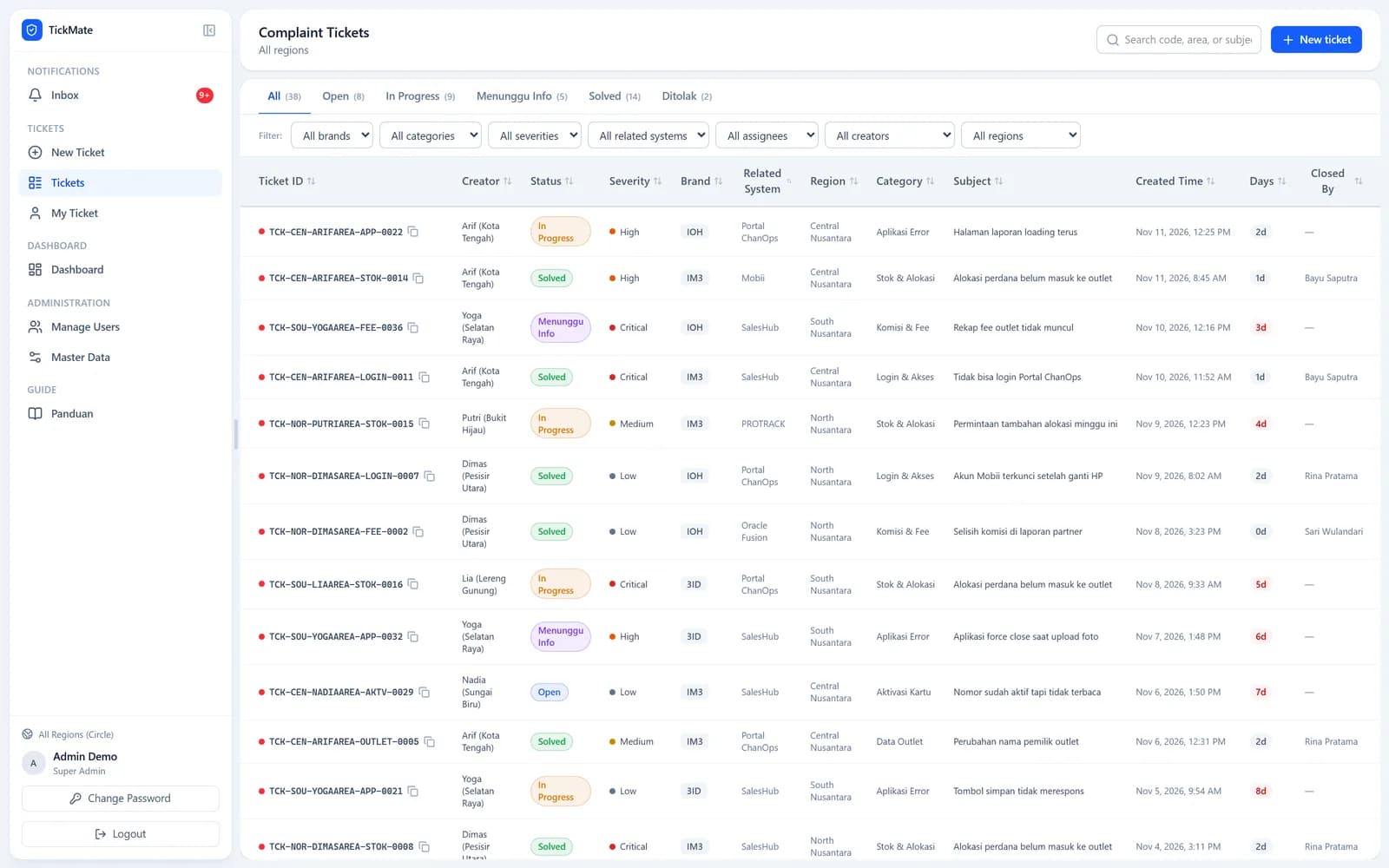
Screens: the real app running on made-up demo data. No real people, outlets or figures.
01 · A ticket's life
From a complaint to closed, with a trail.
- 1
File it
A creator picks region, area and MC from the roster; the server checks the combination and gives the ticket its code inside a transaction.
- 2
Triage
A handler sets the status and assigns someone; the list of people to assign is limited to that region.
- 3
Talk it through
Messages and attachments go on the ticket. Read receipts drive the unread badges and the inbox.
- 4
Close it
Choosing a closed status asks for confirmation, stamps the closing time, locks the ticket and can email the person who raised it.
- 5
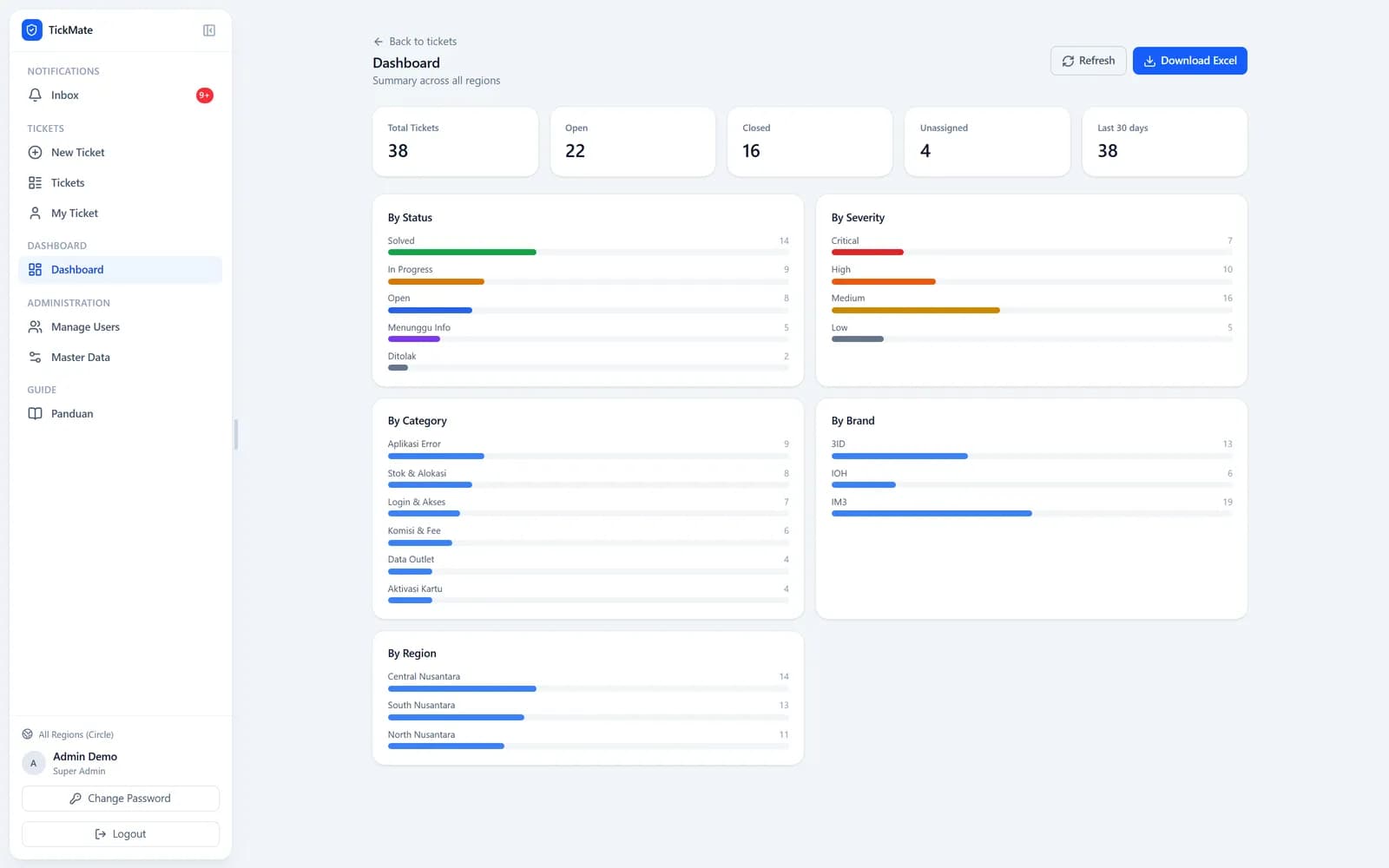
Report
The dashboard and an Excel export summarise everything in the viewer's own scope.
02 · Try the roles
Same tickets, different people.
Pick a role, a sub-role and a scope. The sidebar, the visible tickets and the allowed actions follow TickMate's own rules.
Role
Sub-role
Scope
Sidebar
- Inbox
- New Ticket
- Tickets
- My Ticket
- Dashboard
- Manage Users
- Master Data
- Guide
Complaint tickets
Central region
TCK-NOR-DIMASAREA-LOGIN-0007
North · Open
TCK-CEN-ARIFAREA-STOK-0014
Central · On Hold
TCK-CEN-NADIAAREA-APP-0021
Central · Closed
TCK-OLD-PUTRIAREA-FEE-0003
Central (before split) · Closed · visible through the region it was split from
TCK-SOU-YOGAAREA-AKTV-0029
South · Pending
Can move tickets along and assign them to someone in the same region.
03 · Under the hood
Small rules that keep tickets honest.
A code that explains itself
TCK-{region}-{creator}-{category}-{number}: each part cleaned to letters and digits and cut to length, the number from one counter incremented in the same transaction.
Days open, in red
Days open = (closed time, or now − created) in whole days; an open ticket turns red from day 3.
Unread means unread
A ticket is unread when its last message came from someone else and is newer than your last read. The inbox merges new messages, status changes and new tickets.
Split regions keep their history
When a region is split, the new ones still see tickets filed under the old one.
Attachments behind a check
Images and PDFs up to 10 MB, stored under the ticket and served only after a region check.
04 · Who sees what
Three roles, three sub-roles, two scopes.
A fast token check at the edge, then the server reloads the user and repeats the role checks on every route.
Superadmin
Everything: master data, deleting tickets, editing closed tickets, managing admins.
Admin
Creates and handles tickets; manages user accounts (not other admins).
Creator
Raises tickets and follows their own; can't change status or assignment.
Handler
Moves tickets along, assigns them and adds feedback.
Supervisor
Monitoring only: status changes and uploads are refused by the server.
Scope
Global sees every region; Region sees its own (and the region it was split from).
05 · The small stuff
The parts nobody sees.
Short tokens, rotated
A 15-minute access token and a 7-day refresh token, rotated on every refresh; reusing an old one signs that user out everywhere.
Lockout
Five failed logins lock the account for 15 minutes; unknown usernames still run a dummy hash, so timing gives nothing away.
One quiet refresh
When a request gets a 401, the browser refreshes once (shared by every pending call) and replays it.
Territory checked
An MC needs an area, and the combination must exist in the roster.
Live without websockets
The list and ticket refresh every 5 s, the chat every 3 s, silently; a half-typed feedback is never overwritten.
Deactivate, don't delete
Deleting a user who still has tickets is refused with a hint to deactivate instead.
Excel export
A 17-column sheet of everything in your scope, dated in the file name.
Email only when wanted
The closing email is off by default and goes out without slowing the request.
06 · How it fits together
One Next.js app, one small database.
Browser
React screens
Ticket list, ticket thread, inbox, dashboard and admin pages, all talking to the API.
Server
Next.js App Router
Edge token check, server pages and API routes with validation and role checks on each.
Prisma + SQLite
users, tickets, messages, activity
Disk
attachments, per ticket
Out
Email and Excel
SMTP for the closing email, ExcelJS for exports.
07 · Tech stack
What each piece does.
Next.js 16 + React 19
Screens and API in one app.
Prisma + SQLite
The data, in a single file that's easy to back up.
jose
Signed access tokens.
bcryptjs
Password hashes.
zod
Validating every request body.
ExcelJS
The Excel export.
nodemailer
The optional closing email.
Tailwind CSS
Styling.