Case study · Indosat · Circle Kalisumapa · 2026
Fulfillment Manpower: every sales seat filled, or flagged.
A circle has a fixed number of field-sales seats, spread over regions, areas and MCs and staffed by outside agencies. This app shows who sits in each seat, how long the empty ones have been empty, and fulfillment against target. It replaces the shared master workbook, and still imports and exports that exact format.
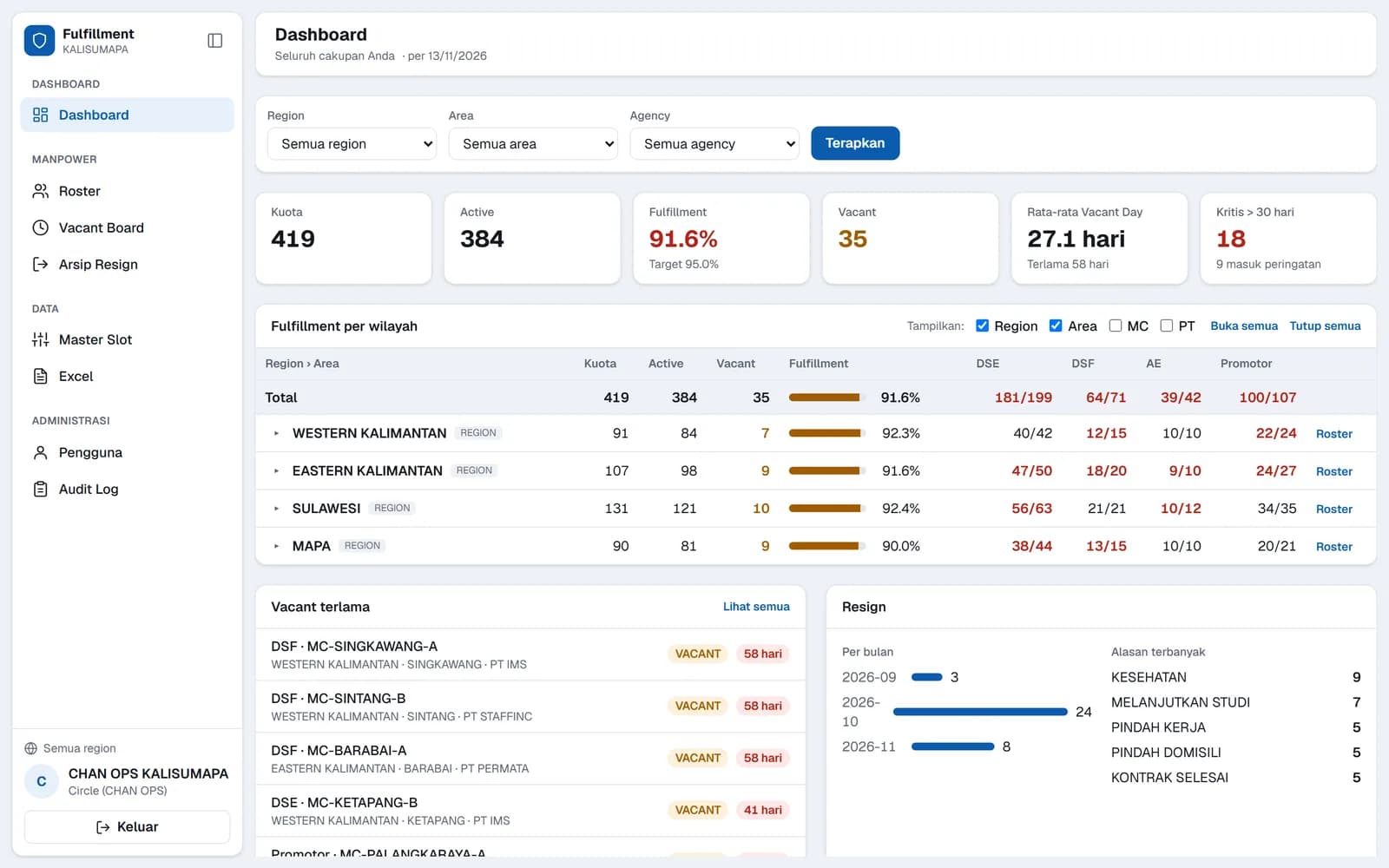
Screens: the real app running on made-up demo data. No real people, outlets or figures.
01 · How it's used
Every seat accounted for.
- 1
Sign in, get scoped
The session says circle, region or agency, and every read is filtered to that.
- 2
Read the dashboard
Quota, active, fulfillment against target, vacant seats, average and longest vacancy, and the critical count, then a Region › Area › MC tree.
- 3
Work the vacant board
Empty seats, longest first. Filling one takes a name and a join date.
- 4
Record a resignation
A date and a reason: the seat turns vacant, the record is archived and the vacancy clock starts.
- 5
Sync with Excel
The circle uploads the full workbook (preview, confirm, automatic backup, replace); anyone exports their own scope.
02 · Try the rules
Resign a seat, let the days run.
One made-up MC with eight seats. Resign or fill seats and drag a vacancy's days: the colours and the fulfillment bar follow the app's own thresholds.
Quota
8
Active
5
Vacant
3
Avg vacant days
24.0 d
Critical > 30 d
1
Fulfillment
62.5%
DSE-01
DSE
Seat holder A
DSE-02
DSE
DSE-03
DSE
Seat holder B
DSF-01
DSF
Seat holder C
DSF-02
DSF
AE-01
AE
Seat holder D
PRM-01
Promotor
PRM-02
Promotor
Seat holder E
03 · Under the hood
Seats are the quota.
Quota = seats
Each seat has an ID made from its role and a unique key. A new seat starts vacant from today, and only a vacant seat can be deleted.
Vacant days
Days since the resign date, counted in Jakarta time. Over 14 days is yellow, over 30 is red and counted as critical.
Fulfillment
Active ÷ quota against a 95% target: green from 95%, amber from 85%, red below.
Resignations
Reasons are kept, counted per month and ranked; a resign date before the join date or in the future is refused.
A careful Excel import
Up to 10 MB; the file applied must be the very file that was previewed; eight sheets' headers must match; dates are validated; duplicates and unknown areas block the import, warnings don't.
Backup before replace
Every import writes a backup first (the newest 20 are kept), then replaces the data in one go.
04 · Who sees what
Three levels, enforced in the data layer.
Checked on the server for every read and write, not only hidden in the screens.
Circle
Everything: Excel upload, backups, users and the audit log.
Region
Its own region's seats; can add, edit or remove seats there.
Agency
Only the seats it staffs; can fill seats and record resignations.
05 · The small stuff
The parts nobody sees.
Preview with consequences
The upload preview counts added, removed and changed seats per role and warns about active people who would disappear.
Exports that still calculate
The exported workbook has live formulas and highlights duplicate IDs, vacant rows and long vacancies.
Safe writes
The JSON store queues writes and swaps files atomically; Firestore writes in batches, adding before deleting.
Sized for the free tier
One document per MC keeps a full load around 170 reads, with a live cache.
Business rules
Some seat types belong to one agency only, some need a PT; a unique ID can't be edited.
No open redirects
After login it only returns to a local path.
Accounts
New users get a one-time set-password link; a role change signs them out everywhere.
Two modes
Runs on a local JSON file for demos, or Firestore with real sign-in in production.
06 · How it fits together
Server components over a swappable store.
Browser
Next.js screens
Dashboard tree, vacant board, roster, resign archive, Excel upload and export.
Cloud Run
Server actions + data layer
Session → scope checks → validation and audit → the store.
Firestore
seats per MC, resigns, audit, backups
Firebase Auth
sign-in, session cookie, claims
Excel
The master workbook
Imported and exported in the same format the team already used.
07 · Tech stack
What each piece does.
Next.js 16 + React 19
Screens and server actions.
Firestore
Seats, resignations, audit and backups.
Firebase Auth
Sign-in, session cookies, role claims.
ExcelJS
Reading and rebuilding the master workbook.
Node crypto + zlib
Signed demo sessions, file hashes, gzipped backups.
Docker on Cloud Run
Hosting.